Posts

Showing posts with the label Wiseduino

Introducing wsduino

Image
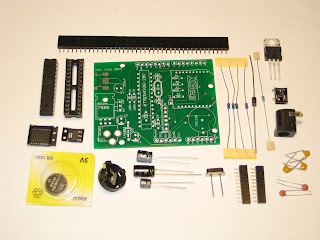
This project is actually a revisit of my old Wiseduino , with the same goal: an Arduino-compatible with on-board Real Time Clock, and some extras (in this case, an XBee-like device, e.g. BTBee, GPSBee, WiFly). I renamed it " wsduino ", although the pronunciation should remain the same :) I redesigned  wsduino  mainly for the Axiris IV3 clock , whose enclosure allows for only 2 boards (Arduino + IV3 shield), with openings for power socket, USB, and no accessible buttons. Essentially, wsduino saves you an extra shield, which would have hosted the RTC (+backup battery) and the XBee.  US$27 - free shipping to North America wsduino is now available as a kit, as shown in the photo below. The wsduino kit includes: PCB ATmega328 processor with bootloader 28-pin socket 16MHz crystal 2 x 22pF capacitor power jack 7805 voltage regulator 1N4001 diode USB miniB socket DS3231 RTC (SMD) A1117 3V3 regulator (SMD) CR1220 battery + holder 4 x 10k resistor 4k7 resistor 3 x...

Wiseduino Next Generation

Image
You have a "tube shield" like the Axiris IV3 shield or the Nixie shield and you want to make a clock. You will definitely need an Arduino. You can either program it to (roughly) count the seconds, minutes, hours, or you can add an extra RTC, specialized in (accurate) time keeping, and program your Arduino to just get the time from RTC. The latter is Wiseduino , the first board I ever designed (also discontinued a long time ago). I badly needed one to finish the Axiris IV3 clock, since neither the software solution (second-counting) nor the hardware solution (adding a second RTC shield) was suitable. And so I re-designed it, improved on existing features (power, RTC) and added new ones (support for XBee/BTBee/GPSBee). This new version, spelled " wsduino " (but still pronounced " wiseduino ") is shown below, next to the Axiris IV3 shield. The wsduino board has an Arduino-compatible footprint, so it fits perfectly in the Axiris-designed-and-made enclosure ...

CubeClock

Image
This would make a nice replacement for the original glass-domed WiseClock . I named it CubeClock for the simple reason that it is encased in a baseball display case, found on ebay for about $5. It includes Wiseduino (with on-board RTC), a LiPo battery shield (I used the one from seeedstudio, but others should work too), a prototype shield with the cheap "orientation sensor" introduced here , and the bi-color LED mini-display shield . The bottom board is the Wiseduino , secured to the box with 2 screws. The other shields are just stacked on top of each other. The battery shield from seeedstudio, discussed here , uses a 1,000mAh LiPo battery (did not come with the shield), attached to the shield itself with plastic ties. The clock can be turned on or off (to save the battery) from the power switch on the Wiseduino . CubeClock can also be powered through the USB cable plugged into the battery shield (which also charges the LiPo battery), as shown below. A closer look is shown...

IllyClock revisited - the minimalist look

Image
Remember IllyClock , the Arduino-alarm-clock-in-a-coffee-can ( featured on Instructables.com )? We now have a new streamlined version, featuring rechargeable battery shield, tilt switches, infrared receiver, buzzer. Although some of the "cool factor" is lost, this version is easier to build, a bit more practical (it is "portable") and smarter (with new, extended, software). It was just a matter of time until someone would prefix the name IllyClock  with an S. I wanted to be the first one on the record to do that; so from now on, we'll name this new version SillyClock . NOTE: One more reason to call it "silly". I wrongly assumed that the previous IllyClock sketch, referencing a rotary encoder, would work without modifications with the new dualRG LED matrix shield , which has the rotary encoder replaced by two buttons. My apologies to anyone whom I misled with my assumption. The modified code can be downloaded from here . This file contains the sketches...